iLabel X

iLabel X
License:
Trial version
Language:
English
Developer:
OS:
Mac OS X
Updated:
See detailed info

Softonic review

Cyril Roger

“Professional label-making made easy”

by Cyril Roger about iLabel X

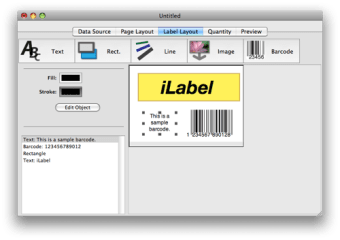
With iLabel, you can create and print out your own labels.

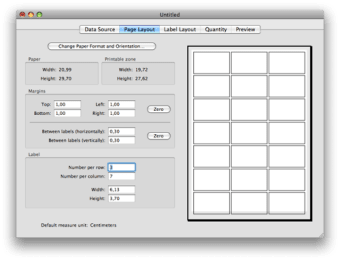
Whether you're looking at creating bar code sheets, business cards, flyers, or labels, iLabel is flexible enough so that you can create the sort of label you're looking for. You'll set the printable zone, page size and margins, the space between labels, and how much labels appear on a page. Width and height of labels can also be adjusted. iLabel also lets you easily import text and you can preview your labels straight from the application window.

Once you're satisfied with your labels, you'll be able to print them out. Make sure you save your settings if you intend to use them again later on. In all, iLabel offers a streamlined process to quickly produce and print out a large number of labels. It is ideal for office and administrative work and for small shops. The only issue with the program is that it can jam every once in a while. If that happens, just close the application and restart it.

Even though iLabel can jam every now and then, it's a good application to quickly produce and print all sorts of labels.
Pros
  • Create precise printing layouts
  • Import text
Cons
  • Can jam
Download iLabel X 2.1.1

iLabel X is virus free

We have analyzed the latest version of iLabel X with 30 antivirus engines and it is virus free. See analysis results.

TESTED VIRUS FREE - Softonic GUARANTEED

Developer's description

iLabel is the perfect application for all your label printing needs. It can also be used for many repetitive printing tasks, such as printing barcode sheets, parcel labels, enveloppes or business cards.

iLabel was also designed to easily produce mail merge labels. By importing a text file from your favorite database or spreadsheet application, you can then easily select records and fields you need to quickly create mail merge labels.

iLabel allows you to save et reopen your favorite layouts for repetitive printings, features an accurate printing preview, and a modern Mac-friendly user interface to let you create your page layouts. Thanks to iLabel, you no longer have to waste time and money trying to duplicate and position manually your label graphics on a page.

Review and rate iLabel X

Your avatar

Your opinion is important.
Help other users - be the first to review this program.

Review
  1. Maximum: 75 characters

  2. See example

Pros and Cons
Rate
  1. What rating would you give iLabel X?

    You need to fill in all fields

    • Usability:

      Not rated
    • Stability:

      Not rated
    • Installation:

      Not rated
    • Functionality:

      Not rated
    • Appearance:

      Not rated
    • Overall rating:

      Not rated
  2. Don't worry, we won't make your email address public.

You're not allowed to share serial numbers, cracks, etc. or link to pages that contain them. If you do, your user account will be deleted, your IP address logged and legal action will be taken.

Get started - just ask a question!

Write a title for your question.

Alternativesto iLabel X

Compare with iLabel X

Screenshots from iLabel X

Download rank: General

9 of 22

Softonic rating:
  • Good
  • 7/10
User rating: (1 rating)
  • Very good
  • 8/10
Your rating:
Your rating
  • 0

Review and rate this program

Top Downloads: General

  • United States
  • Global

  1. A completely new way of messaging